

Download FreeProxy Internet Suite – Network Tools, Connection Sharing, Traffic Management, Content Filtering
Overview
FreeProxy Internet Suite is a specialized network utility designed to streamline internet connectivity across multiple devices. Originally known as FreeProxy, this software enables users to share a single internet connection—whether via modem or cable—among several computers without requiring additional subscriptions. It is particularly suited for home networks, small offices, or any environment where centralized internet access is essential. The application installs on the device with direct internet access, acting as a central hub for managing incoming and outgoing traffic. This setup ensures that all connected devices receive consistent and reliable web access, reducing the need for multiple service plans.
The tool addresses common challenges in network management, such as bandwidth congestion, uncontrolled access, and lack of centralized control. By providing a unified interface for monitoring and regulating network activity, FreeProxy Internet Suite enhances both efficiency and security. It is ideal for users seeking to optimize their existing internet infrastructure without significant hardware investment. The software also supports content filtering, allowing administrators to block specific URLs, restrict IP addresses, or enforce time-based access rules—making it valuable for parental controls, workplace productivity, or shared living spaces.
Although the developer did not provide additional technical details, the app has been in circulation since its release on July 12, 2007, indicating long-term stability and relevance in niche network environments. Its continued existence suggests a dedicated user base relying on its core functionality. The integration of built-in POP3 and SMTP servers further expands its utility by enabling internal email communication without external dependencies, enhancing privacy and autonomy within local networks.
Key Features & Functionality
- Connection Sharing: Enables seamless distribution of a single internet connection across multiple devices. Ideal for users with limited access to broadband services or those looking to avoid redundant subscriptions.
- Traffic Management: Offers a user-friendly interface to monitor and regulate network traffic in real time. Administrators can prioritize certain devices or applications, preventing bottlenecks during peak usage.
- Content Filtering: Allows blocking of specific websites, IP addresses, or time-based access restrictions. Useful for maintaining security, enforcing usage policies, or limiting distractions in shared environments.
- Integrated Email Servers: Includes native POP3 and SMTP servers, enabling internal email communication within the network. Reduces reliance on third-party providers and enhances data privacy.
For example, a small office could use FreeProxy Internet Suite to allow all employees to access the internet through one connection while restricting access to non-work-related sites during business hours. Similarly, a household with multiple users could manage bandwidth usage and prevent unauthorized access to inappropriate content. The ability to control traffic flow and filter content makes it a versatile tool for both technical and non-technical users.
Interface, UX & Performance
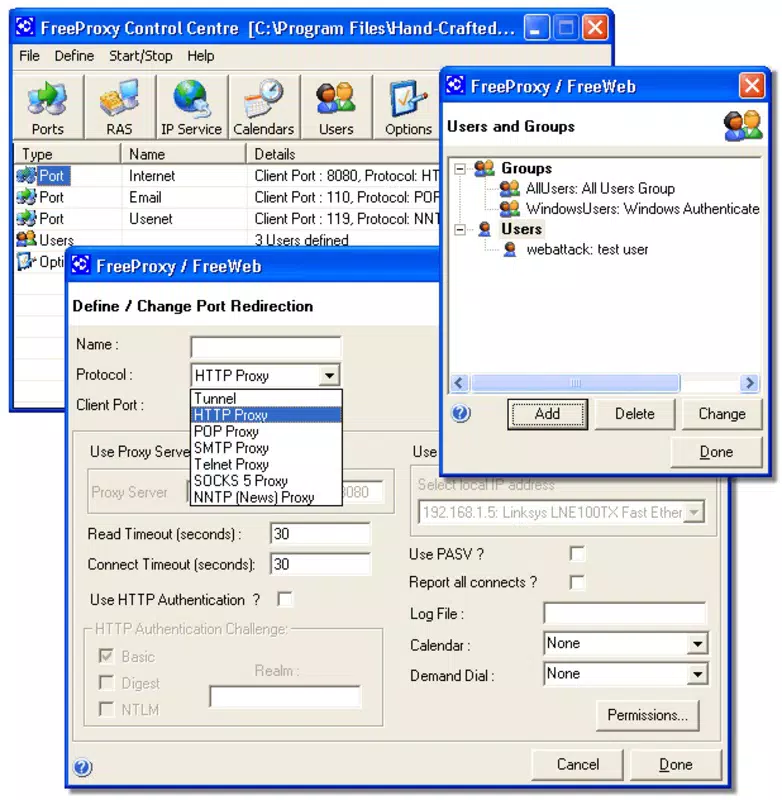
The user interface of FreeProxy Internet Suite is described as intuitive, designed to simplify complex network tasks for users with varying levels of technical expertise. Navigation is structured around core functions such as connection sharing, traffic monitoring, and content filtering, allowing users to access key features without extensive training. The layout emphasizes clarity and functionality, with visual indicators for active connections and bandwidth usage.
Although the developer did not list formal performance metrics, the application has maintained relevance since its 2007 release, suggesting a stable and reliable operation under typical network conditions. Users can expect consistent performance across different device categories, including older systems, as long as the required OS and hardware specifications are met. Responsiveness appears to be optimized for real-time traffic control, enabling immediate adjustments to filtering rules or connection settings.
Stability is a notable aspect, especially considering the app’s age. While no recent updates have been documented, its continued use implies minimal crashes or system conflicts. However, compatibility with modern operating systems may require verification, particularly on newer versions of Windows or other platforms. The absence of detailed system requirements means users should proceed with caution and test the software in a controlled environment before full deployment.
Platform Compatibility & Technical Requirements
FreeProxy Internet Suite is available for Windows-based systems, as indicated by its historical release and functionality. The software was released on July 12, 2007, and has been used primarily on desktop environments. The file size is not specified in the provided data, but given its nature as a network utility, it is likely to be lightweight, though exact dimensions remain undisclosed.
The developer did not specify minimum OS requirements or version compatibility. As such, users should verify whether the application supports current Windows versions, including Windows 10 or Windows 11. Compatibility with macOS or Linux is not confirmed, and no mobile platform availability has been reported. The lack of detailed technical information limits the ability to assess its performance on modern hardware, though its long-standing presence suggests it may still function on legacy systems.
Pros and Cons
Pros
- Enables cost-effective sharing of a single internet connection across multiple devices.
- Provides built-in tools for traffic monitoring and bandwidth control.
- Includes robust content filtering capabilities for enhanced network security.
- Integrates native POP3 and SMTP servers for internal email communication.
- Designed with a user-friendly interface suitable for non-technical users.
Cons
- Release date is from 2007; may lack support for modern operating systems.
- Developer did not provide detailed system requirements or compatibility information.
- No official updates or maintenance have been documented since release.
- File size and version details are not publicly available.
- Platform availability beyond Windows is not confirmed.
FAQ
Is FreeProxy Internet Suite safe to download and install?
Yes, the software is considered safe for users who understand its purpose and use it within trusted network environments. However, due to its age and lack of recent updates, users should exercise caution and ensure they are downloading from official sources.
Can FreeProxy Internet Suite be used on mobile devices?
There is no evidence that FreeProxy Internet Suite is available for mobile platforms such as Android or iOS. It was designed for desktop operating systems, primarily Windows.
Does FreeProxy Internet Suite require an internet connection to function?
Yes, the software must be installed on a device with direct internet access to act as a gateway for other devices. It cannot function without an active upstream connection.
How do I update FreeProxy Internet Suite?
The developer has not released any updates since the original 2007 release. Users should check official sources for potential patches or alternative versions, but no formal update mechanism is currently available.
Can I use FreeProxy Internet Suite for parental controls?
Yes, the content filtering feature allows blocking of specific URLs and setting time-based restrictions, making it suitable for managing internet access for children or limiting distractions in shared environments.
Final Thoughts
FreeProxy Internet Suite remains a notable tool for users seeking to manage and share a single internet connection efficiently. Its combination of connection sharing, traffic control, content filtering, and integrated email servers offers a comprehensive solution for small-scale network management. While its age raises concerns about compatibility with modern systems, its core functionality continues to serve niche audiences, particularly in legacy environments or low-budget setups.
For individuals or small teams looking to optimize their existing internet infrastructure without additional costs, this app presents a viable option. Its intuitive interface and robust feature set make it accessible even to users with limited technical knowledge. However, due to the lack of recent updates and unclear system requirements, users should carefully evaluate its suitability for their current setup.
Download FreeProxy Internet Suite now to explore its network management capabilities and streamline your internet access across multiple devices.


